October 6th, 2014
If you want to record what you are doing on your Windows(8?) there is a little program called “Step recorder” that does just this.
With a magical formula it takes snap shots of your screen and saves as a .mht file which can then be opened in a web browser (ie only?).
I use it for instance when manipulating servers and other hairy stuff to record what I was doing. If I need to I can then look for clues why an update didn’t work.
It can also be used for aiding you mom who complains about whatever icon that doesn’t show up when it should. Start Step recorder, let her do her stuff, stop/save Step recorder and then email the resulting file. YMMV
Here is another usage: You have a bug that shows only sometimes. Record what you are doing and wait for the bug to show its face. Look at how you got there in the mht file.
January 28th, 2013
Encrypt android
With the later (exact version unknown) it is possible to encrypt the whole Android device. This should mean that anyone getting hands on your machine can’t get to its data. I don’t know the encryption method nor do I know if there are any holes to exploit that makes the encryption moot.
Just go look in the Settings and there is a Security and from there you’ll find your way.
The memory card can be encrypted too.
For encrypting a device one must start using a pass code to start the machine.
For security one should also have a pass code to open it. Now this can be tedious, pressing in 4 characters or more every time you want to do a small check.
Try out Llama. It can react on the cell masts/IDs and in a beta to WLANs. For instance have the device not being locked while being at home (close to a mast or within your home’s WLAN range).
Restore a Google nexus 7
First hits when googling google nexus restore are various kinds of holding down power button and up/down volume.
If this does’t work there is a hidden while doing System restore I found here.
If you are so out of luck this doesn’t work go here to do a full OS replacement.
January 25th, 2013
SHORT
If you convert table like data, think Excel and manipulation, before being able to use it:
There is a tool called Openrefine for this and it is free.
TL;DR
Sometimes one gets a file from the customer to import into a system. The received data is almost correct.
So one opens a spread sheet, pastes/imports and start converting. After a while deed is done and case is closed. Then one gets a new file and redoes everything.
In my above, real life, example a spreadsheet program like Excel or Openoffice-Calc is used. But that is not what it is created for, or best at, or even good at.
I have wished for a program created for importing and converting data. And it has existed since many years, albeit seldom mentioned.
http://openrefine.org/
June 20th, 2012
The Cats and travel program/solution/functionality is possibly probably the worst program I have been forced to use during my entire life.
I compare it to the ones I have written myself and won’t touch with a 10 meter pole. I compare it to lousy hacks sent to me to solve a problem and nothing else. I compare it to the wierd programs that came to live about the birth of Windows3. I compare it to any program I have ever stumbled upon on any machine on any device during any circumstance; including boat electronics, old WindowsCE and washing machines.
It isn’t just bad. No. That is not how bad it is. It is worse. There is a special place in hell for the responsible behind the product. That place is situated right next to the place for the ones that buy it to use in their business Against their employees. They have obviously never used it as human beings.
It is pure eevulness devouring your soul.
March 31st, 2012
I have created a better Windows keyboard layout for developers. It is very similar to the US keyboard but with a few tweaks that makes it nicer to work with. For a regular US keyboard user the only difference is less pressing of the shift key.
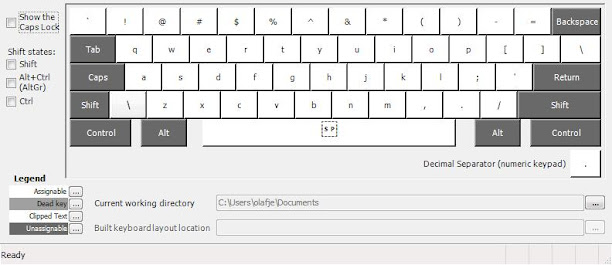
Download it here, of course as open source.
Longer story:
The US keyboard is a good working start for a better developer keyboard since most languages are created for the US layout.
Symbols often need shift to be pressed.
As developers we often press ( and ) and = and @ and the other symbols at the top row, but to reach them we need to press shift. That is a total waste. So I switched them. With Keyboard 1337 you instead press shift to reach the figures. Or use the num pad.
Alt-gr-\
Swedish developers have a problem with the keyboard layout. For instance backslash “\” is reached through “alt-gr”, a button to the right of the space bar and then 7. There is no good way to press those two buttons without hand gymnastics. My solution is to switch to US layout.
ÅÄÖ
I need ÅÄÖ and instead of switching keyboard every time I need one of those letters I put them in their regular place but activated with alt-gr. A solution that works better than it sounds.
Physics
The physical keyboard layout doesn’t change due to installing a new keyboard layout so you have to have a bit of fantasy or switch the plastic keys if possible.
March 25th, 2012
I have started at a new job and after some days of contemplation and a try-out I decided to go for running Windows as a virtual machine under OSX on an Macbook pro.
I had several reasons in no particular order.
– The hardware is nice. The rumour is that Apple don’t buy cheap stuff on the spot market. When you use a Mac it feels nice and I can play with it in the store; ordering a Dell over internet doesn’t give me the chance to handle it.
– I need to learn other stuff than the Microsoft stack. If you use a thing for long enough you start to believe the world has to be that way. I want to get that rust out of my fingers. I have installed linux several times but without being forced to use it, it has all but collected dust. Digital dust.
– I want to get started with using virtual machines for developing. I have tried developing on a Windows virtual machine on a Windows host before but failed; it was too easy to use the host for everything.
Setup:
17″ screen, 7200rpm hd, antiglare. The rest is stock and will be upgraded as time goes.
I intend to use Parallels for running my Win machines virtual. If the hardware can’t handle it I should be able to use the same virtual drive through Bootcamp.
I can’t afford SSD right now even though it was a requirement to start with. Apple’s prices are too high so I will buy on the spot market later.
I can’t afford 8gigs right now and Apple’s prices are too high so I will buy on the spot market later. I am running Win8 on 1,5gigs and that is not enough it needs at least 4. My machine doesn’t take more than 8 gigs according to the specs so I’ll probably have problems running more than 1 virtual OS at once.
For better and worse:
I have played with the first Mac thousands of years ago, worked with Mac during the 90s and I have played with my SO’s Macbookpro so I know a little from beforehand. But playing and working with pre-OSX is not the same as knowing.
The win keyboard is arguably better than the mac one. It has page up and page down as separate buttons. Yes it can be remedied by pressing fn at the mac keyboard but that not the same. The delete button is also missing and corresponding work around is more cumbersome, instead of 3 delete presses for deleting 3 characters one has to press 3 shift-right and then one backspace. If you are used to fiddling around with the mouse for moving your caret 3 characters to the right this isn’t a problem for you. But then you probably have blunt knives in the kitchen anyway.
The OSX keyboard doesn’t have a properties button but I instead have to use shift-f10 in Windows (which really is what the properties button is a shortcut for). It. Is. Not. A. Proper. Workaround.
The apple touch pad is awesome. It is awesome enough, on its own, to argue for running Win on a Mac through Bootcamp. The best touchpad I have tried on Win isn’t even close to the Mac. I use 10.7.3 and it has an even more awesome touchpad with up to 4 (5?) fingers recognition for doing stuff. I gladly confess it isn’t perfect and sometimes miss my swipes but it won’t push it from 1st, 2nd and 3rd place.
I recommend turning on all the features on the touchpad. They features are not turned on out of the box.
On the other hand, keyboard handling and shortcuts in Windows is way better than in OSX. OSX is created for people with three hands, two on the keyboard and one on the mouse. If you think using the mouse for moving around in your application is state of the art you probably have blunt knives in the kitchen too.
Give me the Mac touchpad and the Windows keyboard handling and we have nerdvana. Wait… that is what I am sitting with right now!
Appstore is a must. But why does it want to know so much about me? On my Android phone I can download anything free without giving away my credit card number.
Through my bank I can create virtual credit cards with a limited amount of money on. It works on Appstore.
OSX doesn’t have as many good gratis text editors as Windows has.
The installation of OSX is smooth. Start the machine, do your choices and you are good to go. Windows, on the contrary, requires a day and a half for reboots and checks for updates. Add another day if you want Visual studio and Sqlserver.
OSX doesn’t run the full fledged dotnet framework but Mono. Dotnet is a good framework so it is a shame.
I use Keepass on Mono in OSX. To make a long story short it fails in several ways. The most noticeable is that the good copy-password functionality in Keepass doesn’t work. Add mismatched highlighted text, crashes and that it sometimes refuses to start. It might be a bad port of Keepass, it might be shortcomings in Mono. If you give me time I will investigate but as for now I am short of spare time.
OSX has a proper *nix/BSD terminal. Windows still has its console and Console2. Windows also has Powershell which is *nix terminal piping made right. Like so: in *nix one can do lots of automation from the terminal through piping and griping. A big drawback is that what is piped is the text output and not the contents. Powershell can also pipe data between apps but uses real dotnet objects instead. Ponder this for a while and realise what a leap that is in functionality and updatability.
One of the reasons for choosing to use both OSX and Windows is to not fall into the belief that everything should look like Windows. The start menu is one of them. I have always thought the start menu was a good idea, especially after Vista when one could start entering text directly and let Windows find the application or document for you; much like Spotlight in OSX. Now I have seen OSX’s 5 finger pinch which gives me all apps as icons over the whole screen. (think iPhone) It has the same drawback as the Iphone app chooser – there are lots of icons but no system to separate them for making them easier to find.
Minimising and maximizing works better in Windows than in OSX. There are system wide short cuts and visual clues (menus that pop up). OSX can minimize a window but one needs the mouse to open it again. Sometimes.
Which brings me to Safari which has recently passed IE as the least good web browser. Example: if you detach a tab you cannot attach it again. Unless you choose to mouse to the menu window-merge all windows. When every tab in every Safari window is put into the same window. I am not saying all other browser behave differently but right now I am irritated on Safari so it has to wear my flames.
I am not irritated on Evernote but it is equally mousey. If one hides a window of Evernote one has to use the mouse to get it back.
The TextEdit editor in OSX is better than Notepad in Windows. On the other hand Notepad is (easily) replaced with other good and gratis editors. Good and gratis editors in OSX are not as plenty.
I miss the light telling me the HD is working. When the machines doesn’t respond for a few seconds it is a good clue to what is going on – is it the HD or the code that is the culprit?
My OSX version has switched up and down while scrolling. I say the OSX direction is the correct one.
Here is why: when I programmed scroll bars back in last century I learned that there is no correct way regarding what is up and down. The document goes down when the scroll bar goes up when the earlier/above text is shown when the up arrow is pressed. Now we have learned to use fingers for moving documents around and now there is only one way to look at it; the correct way.
You, dear reader, might disagree, but I suggest you embrace change, mr Quixote.
Notes:
Parallels has its own Swedish keyboard. I don’t know the difference between that and the regular OSX one.
Windows ctrl-alt-del is in Parallels fn-ctrl-alt-backspace.
I have yet to figure out where backslash is on my Swedish OSX, Swedish Win and English Win keyboards. I am not sure Parallels work properly there.
Folders in Finder is opened through command-o. Enter does something else. I won’t say it is 100% bad but I believe the Windows choice of making Enter open the folder is better.
I really miss having standardised command-o for opening, -w for closing a window, -h for hiding a window, and command-comma for settings in Windows. Alt-f4 and ctrl-f4 are steady standards in Windows but the combinations were probably invented by a chiropractor gone mad. Ctrl-o is standard and alt-enter almost so. OSX could learn something from Win what happens when a window is hidden, opening a hidden window on OSX changes from app to app and often requires the mouse.
Switching tab in windows is ctrl-tab and command-left/right in OSX. Unless where it is ctrl-tab. The gratis editor Textwrangler has its own scheme where switching document isn’t visualised as a table and requires the mouse. Which made med ditch Textwrangler since a text editor is keyboard centric and shouldn’t force me to stretch of for the mouse or move my fingers to the touch pad.
Ctrl-left/right is used in Windows for selecting a word. In OSX it is used for switching desktop. I had to turn that functionality off in OSX. I now have to do a 4 finger swipe to change desktop. I see no immediate other solution.
When I get in to heavy programming in Windows on this machine I will bring forward my Windows keyboard. I wonder how my muscular memory will react when it is subjected to the OSX layout. I plan to update this article. Let’s see if I remember.
Pressing the function buttons in OSX requires the fn key. In Windows it does not. Thankfully there is a setting in OSX System preferences to turn this off. Recommended if you run Windows under OSX.
Zooming in OSX is done through ctrl-scroll up/down (two finger swipe) much like in Visual studio. Windows has a similar functionality I can’t recall the name of and shortcut for. I have a feeling the Windows variant works better.
Update
Multi monitor support does work. Sometimes. The first time I chose it (can’t remember the name and can’t get to it – more on that further down) my second monitor lit up directly; just like “extend monitor” in Windows. A Windows boot later it refused to extend to the second monitor. Until it worked again. Unfortunately I don’t remember what I did because later Windows stopped recognising the second monitor again. Some googlingwithbing later I found a new button in Parallels that makes my second monitor availabla again. It is even better since it puts my monitors on the Mac desktops so I can choose where to se a single win monitor and single mac monitor at the same time in my multi monitor setup. According to my historical statistics this too will fail soon and I will find another solution/button/checkbox/reboot.
Here’s a caveat with my “new” multiple monitors in mac/parallels/win: I can’t get to the Parallels menu in Windows. Therefore I can’t see the original menu I used for multiple monitors and I can’t do any other settings either.
Is the text above unreadable? Yes it is. Understanding multiple monitor setup in Mac/Parallels/Windows is undoable so it is just right the explanation is unreadable too.
